
.chat widget
- Does the chat work on Twitch and YouTube?
Yes! Our chats work on both Twitch and YouTube, and can be used separately or in multistream (both platforms at the same time).
Installation is done via a Streamlabs widget URL, so you can use the chat in any software that supports Browser Source, such as:
• OBS Studio
• Streamlabs Desktop
• StreamElements OBS
• Prism Live
- What if I stream on both (Twitch + YouTube)?
During multistreaming, the chat can display messages from both platforms in real time.
Each message includes a platform indicator (such as the logo) for easy identification, and this option can be enabled or disabled directly on the Streamlabs website.
For creators who want a more personalized experience, we offer the "Platform Design Variation" add-on, allowing us to create unique visual styles for each platform’s messages, whether through colors, alternating sides, custom icons, or other design elements.
Please note that cross-platform chat integration is available upon request, but we are not responsible for any potential violations of Twitch’s simulcast policies that may result from using this feature.
- Which features work on YouTube?
Due to Streamlabs’ current limitations with YouTube, some advanced features are not fully supported outside of Twitch.
Fully supported on YouTube:
• Animations
• Notifications
Unavailable on YouTube:
• Custom emotes (don’t appear in chat)
• Custom roles
• Pronouns
Some messages may take 2–5 seconds to appear on the overlay. These restrictions come from the YouTube API, not from our system!
Note: On Twitch, the chat has full support for all our addons and visual features!
.learn more about our chat addons
- Custom roles (Twitch only): personalize visual aspects of different user roles, being them viewer, subscriber, vip, owner, and mod. this add-on primarily modifies colors, adds distinctive icons for each role.
Note: Sub roles are not tier specific, all subs are grouped under the same visual role;
Changing the color of certain elements may prevent them from being animated.

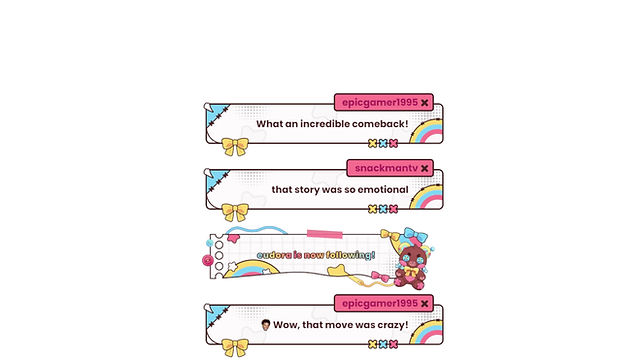
- Notifications (Twitch or YouTube): integrates real-time alerts directly in the chat, notifying you of new activities on your channel, such as new followers, subscribers, cheer, donations, raids, membership, superchat...
Note: All alerts use the same design — only text changes;
Mascots can be added to alerts only; please show it first so I can confirm if there’s an extra fee;
If you’d like all your notifications to share the same visual design, you only need to purchase one variation. However, if you want different designs — for example, to distinguish alerts for raids, subscriptions, and donations, or to differentiate YouTube notifications from Twitch notifications — you’ll need to purchase additional variations accordingly.

- Big emotes (Twitch only): Enlarges emotes when they are sent alone in a message, making them stand out in the chat.
- without big emotes:

- with big emotes:

- Animations (Twitch & YouTube): is an add-on that adds animation to the assets used in chat messages and alerts, including the entrance of the messages and alerts boxes themselves.
Note: Since it requires a different file format (.webm or .gif), some assets with custom colors from the custom roles add-on may not be compatible with animation.
- with animations:

- without animations:
- Pronouns (Twitch only): This add-on integrates pronouns into your Twitch chat using a third-party extension. It automatically displays each user's chosen pronoun next to their name, if available. Pronouns are added from the extension pronouns.alejo.io where you (and your viewers) can link your Twitch account, choose the pronoun and it will be displayed in the chat!
